note this well
notabene
Complete documentation
Guide
What is notabene?
What is notabene?
nota bene — the margin mark that means “note this well.”
notabene renders your repo’s Markdown/MDX as a navigable site with review comments right on the page, and ships the human↔agent review protocol that turns those comments into edits. The viewer is the support — the protocol is the product.
The problem it solves
Fixing or writing docs with an AI agent means turning every change into prose: quote the passage, name the section — “can you fix the wording in section 3” — then hope the agent re-finds the exact spot in the source. Past a couple of changes it’s a wall of instructions in one chat input. The real instruction was always simpler: this passage — change it like so.
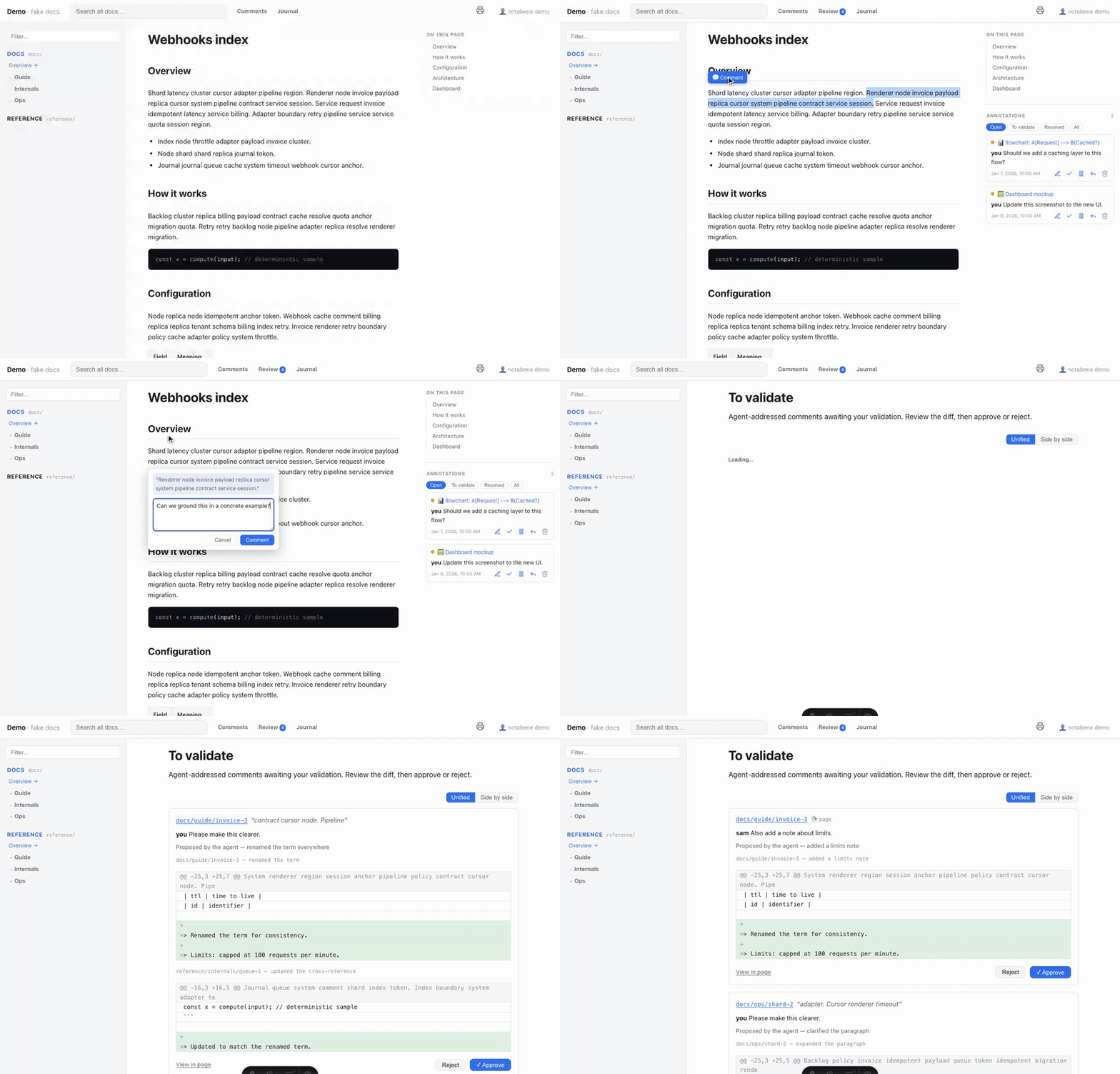
notabene makes that the interface. Select the exact text on the rendered page — or a whole diagram or image — and leave a comment right there. The anchored comment is the instruction: located, unambiguous, nothing to quote. The agent reads the comments, edits the source faithfully, marks each resolved, and journals what changed & why.
The loop, in 30 seconds
npx notabene dev→ open the site, select any text → leave a comment (or comment a whole page, diagram or image). Threads, resolve, hold, a global/commentsview.- Tell your agent: “address the doc comments.”
- The agent reads
.notabene/, edits the docs faithfully, marks each comment resolved, and appends a journal entry (what / why / which comments). - Read the trail at
/journal— or validate each diff yourself in approve mode.
Everything is in your git
Comments and journal are plain JSON files under .notabene/ — no SaaS, no database,
no account. They travel with your repo, diff in PRs, and are readable by any agent: the
review protocol is file-I/O-first (no server, no port, no MCP required).
Where to go next
- Install — the npm renderer, the Claude Code plugin, or both.
- Your first review — from a comment to a journaled edit.
- Configuration — the one config file, by example: spaces, branding, navigation links and footer, custom home page.
- Customize the look — branding, design tokens, fonts, code theme, your own stylesheet.
- The review loop — auto vs. approve (human-in-the-loop diffs).
- Authoring docs — the rendering palette: GFM, Mermaid, code, links.
- Multi-language docs — EN/FR/… with clean URLs and a switcher.
- PDF export — print-ready views and bookmarked PDFs.
- Publish a public site — a read-only, agent-readable static site.
Looking for exhaustive tables instead? Head to the Reference space: the CLI, every config key, the frontmatter, the store contract and the safety model.
Install
Install
notabene is two installable pieces: the Claude Code plugin (turnkey setup + the review loop) and the renderer (an npm package + CLI). They install independently — the plugin does not need the npm package: it fetches the renderer on its own.
The Claude Code plugin — setup + review
In Claude Code:
/plugin marketplace add z29k/notabene
/plugin install notabene@z29k
That’s the whole install — no npm install required. The plugin fetches and runs a
pinned version of the renderer itself via npx (the first run downloads it, ~30 s);
nothing is scaffolded into your repo, and your repo doesn’t even need a package.json.
The only prerequisite is Node (see requirements below).
Then just say “set up notabene” (fresh repo) or “address the doc comments” (already set up) — the right skill triggers on its own.
Prefer manual install? Copy packages/claude-plugin/skills/notabene/ into your project’s
.claude/skills/. Using another agent entirely? You don’t need the plugin at all:
notabene init writes the same protocol to <store>/protocol.md and points at it from
AGENTS.md (see using it from any agent).
The renderer — npm package (without Claude)
To drive the CLI yourself — by hand, in CI, or from another tool — install the npm package:
npm install -D @z29k/notabene   # or: pnpm add -D @z29k/notabene · bun add -d @z29k/notabene
npx notabene init               # writes notabene.config.mjs + creates the .notabene store
npx notabene dev                # → http://localhost:3009
The npm package is scoped (
@z29k/notabene); the CLI command it installs is justnotabene, sonpx notabene …works as-is.
init is the only thing that touches your repo — it writes notabene.config.mjs and
creates the .notabene/ store (init --detect prefills roots[] from the doc folders it
finds). The renderer itself runs from the package: nothing is scaffolded or copied
into your repo, and upgrading is just npm update.
The full command surface (build, pdf, status, migrate, comments, journal…) is in the CLI reference.
Installing both is fine: the plugin always runs its own pinned renderer version
(matched to the plugin’s version), independent of the one in your package.json — the
two never conflict.
Requirements
Both routes share the same prerequisites:
- Node ≥ 22.12 and
npxon your PATH (both ship with Node). - Any repo with Markdown or MDX files — see MDX and CommonMark for how the two formats are handled.
Next: your first review.
Your first review
Your first review
You have installed the renderer and run npx notabene dev. Here’s the
whole loop once, end to end.
1 · Comment the rendered page
Open http://localhost:3009, browse to any page, and select a passage — an action
bar appears; leave your comment right there. You can also:
-
comment a whole page (the comment box at the bottom of each page);
-
comment a whole diagram or image — hover it and use the 💬 in the toolbar (the ⤢ next to it opens a pan/zoom lightbox);
-
reply in threads, put a comment on hold (⏸ — the agent will skip it), and see everything across pages at
/comments.
On a phone or tablet the same loop works touch-first: the nav folds into a drawer, comments become bottom sheets, and you can select text and comment with your thumb. Drag a sheet’s handle up to expand it, down to dismiss it.
2 · Hand the comments to your agent
Tell your agent — with the Claude Code plugin it’s just:
address the doc comments
The agent reads the .notabene/ store directly (no server needed), locates each
commented passage in the source file, applies the feedback faithfully, marks the
comment resolved, and appends a journal entry linking what changed to why.
It then verifies: the renderer build always runs, plus any checks you list in
verify[]. It never commits without asking.
3 · Read the trail
/journal— every pass, with what/why/which comments per page.- Each resolved comment links its journal entry.
Want to validate each edit yourself before it counts as resolved — with the real git diff? That’s approve mode: see the review loop.
Working with several reviewers
Comments carry an identity (name + optional email), set per browser via the 👤 chip in the header — so threads attribute per person, not per machine. The store is one JSON file per comment, so parallel branches merge without conflicts.
Configuration
Configuration
notabene.config.mjs at your repo root is the only wiring. Paths are repo-relative.
notabene init scaffolds a commented template; notabene init --detect prefills
roots[] from the doc folders it finds. Every key is optional — this page shows the ones
you’ll actually touch; the config reference lists them all.
// notabene.config.mjs
export default {
  siteName: "My Project",
  tagline: "docs",
  locale: "en",

  // Input format: "commonmark" (lenient, zero MDX) or "mdx" (.mdx strict + .md lenient).
  format: "commonmark",

  // Doc spaces. `key` = URL slug + store space; `path` = repo-relative folder.
  roots: [
    { key: "docs", label: "Docs", path: "docs", exclude: [".notabene/**"] },
    { key: "adr", label: "Decisions", path: "docs/adr", description: "Architecture decision records" },
  ],

  store: "docs/.notabene",   // comments + journal (commit this folder)
  review: "auto",            // "approve" = you validate each edit with a diff
  verify: [],                // your own post-edit checks (the renderer build always runs)
};
Spaces (roots[])
Each entry becomes a space: its own section in the sidebar, its own card on the home
page, its own prefix in comment ids. A nested root (like docs/adr above) wins over its
parent for the pages it contains — the most specific path rules. label and
description accept a per-locale map when i18n is on.
MDX and CommonMark/GFM
The renderer picks the processor by file extension:
.md→ CommonMark/GFM, lenient.<email@x>,Promise<T>,{var}, raw HTML and GFM tables all render without a crash..mdx→ strict MDX (JSX/expressions) — importable components, but</{outside code fences must be escaped.
format: "mdx" (the config default) enables both, mixable in one repo.
format: "commonmark" (what init scaffolds) drops the MDX dependency entirely — the
safe, most-lenient starting point for a plain-Markdown repo.
Branding
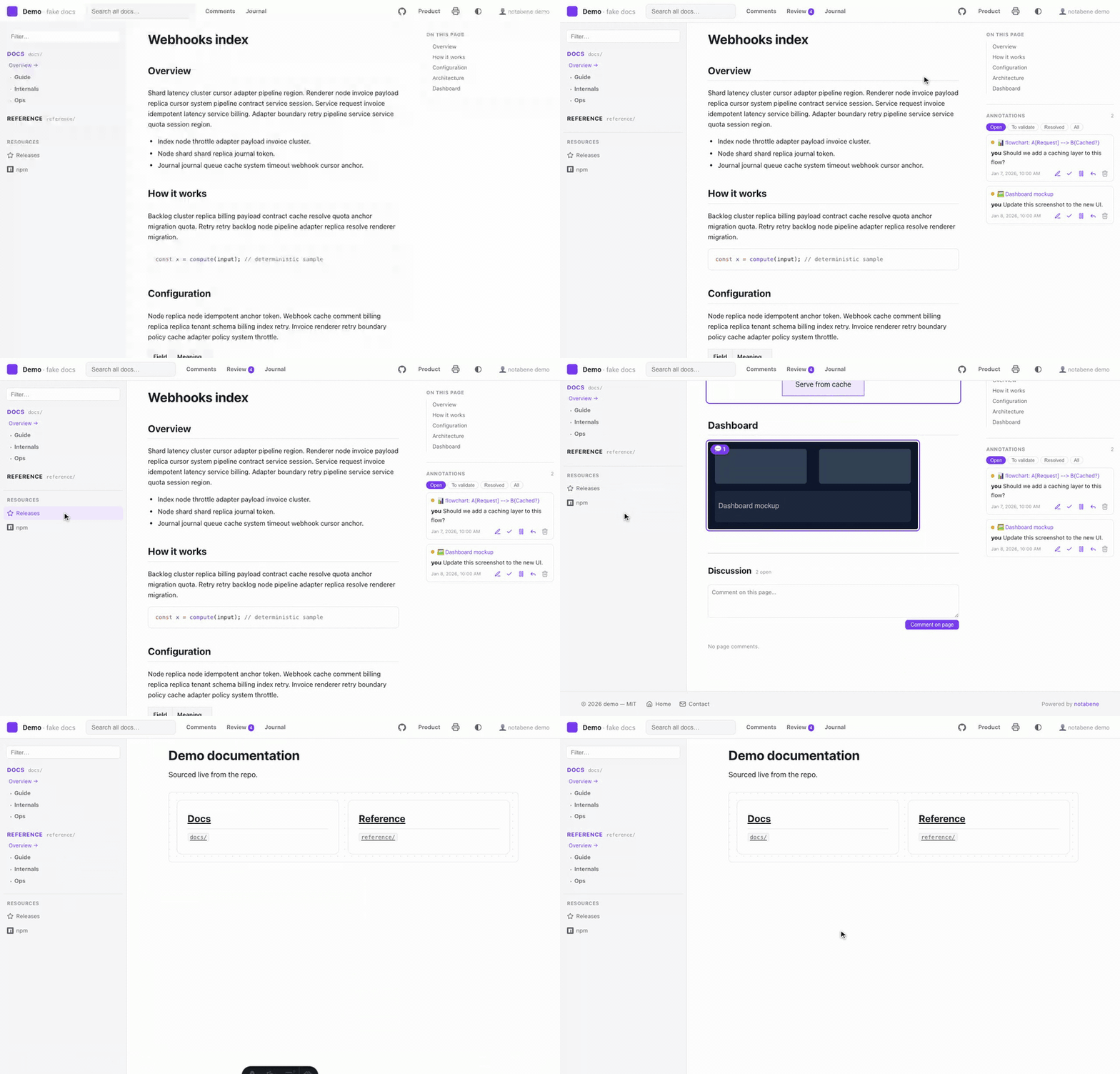
Point the header, browser tab and social cards at your own assets — repo-relative files, served by the renderer (nothing to copy anywhere):
branding: {
  logo: "assets/logo.svg",           // topbar image, next to the site name
  logoDark: "assets/logo-dark.svg",  // optional dark-mode variant (else logo everywhere)
  favicon: "assets/favicon.svg",     // .svg / .ico / .png — unset → a built-in default mark
  socialImage: "assets/og.png",      // og:image / twitter:image of PUBLIC builds
},
socialImage needs publish.site — crawlers require an
absolute URL. The favicon also covers the print/PDF views.
Navigation links
Once a reader is inside a page, nothing leads back to your repo, your product or your
releases. nav adds those outbound links in three places — one item shape everywhere:
nav: {
  // Topbar, right-hand group. Mirrored automatically in the mobile drawer.
  header: [
    { label: "GitHub", href: "https://github.com/you/repo", icon: "github", iconOnly: true },
    { label: { en: "Product", fr: "Produit" }, href: "https://example.com" },
  ],
  // A titled block under the space tree (the mobile drawer shows it too).
  sidebar: {
    title: { en: "Resources", fr: "Ressources" },
    links: [
      { label: "Releases", href: "https://github.com/you/repo/releases", icon: "star" },
      { label: "npm", href: "https://www.npmjs.com/package/your-pkg", icon: "npm" },
    ],
  },
  // The site footer. Nothing configured → no footer element at all.
  footer: {
    links: [{ label: "Licence", href: "/reference/licence" }],
    text: { en: "© 2026 you — MIT", fr: "© 2026 vous — MIT" },
    poweredBy: false,
  },
},
| Field | Meaning |
|---|---|
label | Required. A string, or a { <locale>: string } map like roots[].label. Doubles as the accessible name when iconOnly |
href | Required. An https:///http:///mailto: URL (opened in a new tab, rel="noopener"), or a site path /… (your publish.base is applied for you) |
icon | One of github, gitlab, npm, discord, slack, x, mastodon, rss, mail, book, home, star, download, external. Monochrome — it follows the link color, so it follows your theme |
iconOnly | Topbar only: show the icon alone (the label becomes its aria-label/tooltip). Ignored elsewhere |
publish | false keeps the link out of public builds — same idea as roots[].publish |
- Everything is validated when the config loads: an unknown key, an unknown icon, a
duplicate href or a
javascript:URL throws immediately rather than shipping a broken — or booby-trapped — link into a published site. - These links are identity, not review tooling: unlike Comments/Review/Journal they show in dev and in public builds. They never appear in the print/PDF views, and they are outside the search index.
- Keep the topbar to three or four entries —
iconOnlyexists precisely because that row is crowded. Long lists belong in the sidebar block or the footer.
Custom home page
By default the landing page (/) shows the site name and one card per space. Point
home at a Markdown file to render your own welcome above those cards — the classic
move is a README-like intro written for the site, with relative links that become
routes:
home: "docs/home.md",- Full pipeline: Mermaid, code highlighting, and inter-doc links rewritten to site
routes — link straight into your spaces (
[install](./guide/install.md)). - Best kept outside your spaces (a dedicated doc): inside a space it would also render as a normal page of that space.
- With i18n, pass a per-locale map:
home: { en: "docs/home.md", fr: "docs/home.fr.md" }— each locale’s landing (/,/fr) renders its own file. - This site’s home page is exactly that — see
docs/home.md.
Page footer: edit link & last-updated
Two zero-config touches under every doc page:
- Last updated — the page’s git author date (one streamed
git logper build; alastUpdatedfrontmatter date overrides it; silently absent outside a git repo). Public builds also emit it asarticle:modified_time. - Edit this page — set
editPatternand every page links to its source:
editPattern: "https://github.com/you/repo/edit/main/{path}",It is rendered only where the in-page editor is not available — that
is, in builds and published sites. Under notabene dev the editor is the better way to
do the same thing.
In-page editing
Under notabene dev, a ✎ in the margin opens any block for editing right in the page —
see Editing in the page. It is on by default and needs no configuration;
these are the knobs if you want them:
edit: {
  enabled: true,      // false hides the editor entirely
  requireGit: true,   // false allows writing a file git isn't tracking
},
roots: [
  { key: "reference", path: "docs/reference", edit: false },  // read-only space
],
Sidebar labels & ordering
By default a page’s sidebar entry is its humanized file name and siblings sort alphabetically. Override either per page with frontmatter — no numeric file-name prefixes needed:
---
title: Internal network map      # page <title> + breadcrumb (overrides the H1)
sidebar:
  label: Network map             # sidebar text (else title, else file name)
  order: 9                       # position among siblings (ascending)
---ordersorts ascending; entries without one keep sorting alphabetically, after the ordered ones. Groups and pages share one ordering.- A folder is named and positioned by its landing page —
<folder>/index.md(orreadme.md) — whosesidebarfrontmatter applies to the whole group; that page shows as a localized Overview entry (rename viasidebar.indexLabel). - These labels flow through to breadcrumbs and PDF export.
The full frontmatter surface (including description and publish for
public sites) is in the frontmatter reference.
Customize the look
Customize the look
notabene runs from the package — you never fork its UI. Everything below is config-driven instead:
- Branding — logo, favicon, social image.
- Design tokens — override the
--nb-*custom properties (below). - Your own stylesheet — a CSS file loaded after the renderer’s styles.
- Fonts and images — a folder of your repo, served for that stylesheet.
- Code and diagrams — a Shiki theme for code blocks; Mermaid follows the tokens.
Outbound links (topbar, sidebar, footer) are not part of this: they’re repo data, not appearance — see navigation links.
theme: {
  // Quick overrides, no file needed. A plain value applies to BOTH color schemes;
  // a light-dark() pair customizes each: light on the left, dark on the right.
  tokens: { accent: "light-dark(#7c3aed, #b79bff)", radius: "4px" },
  css: "docs/notabene-theme.css",                 // or/and a full stylesheet
},
Both target the same contract; a typo’d token name throws at startup (never a silent no-op). The renderer’s own styles live in CSS cascade layers, so your un-layered CSS always wins — no specificity war, no ordering luck.
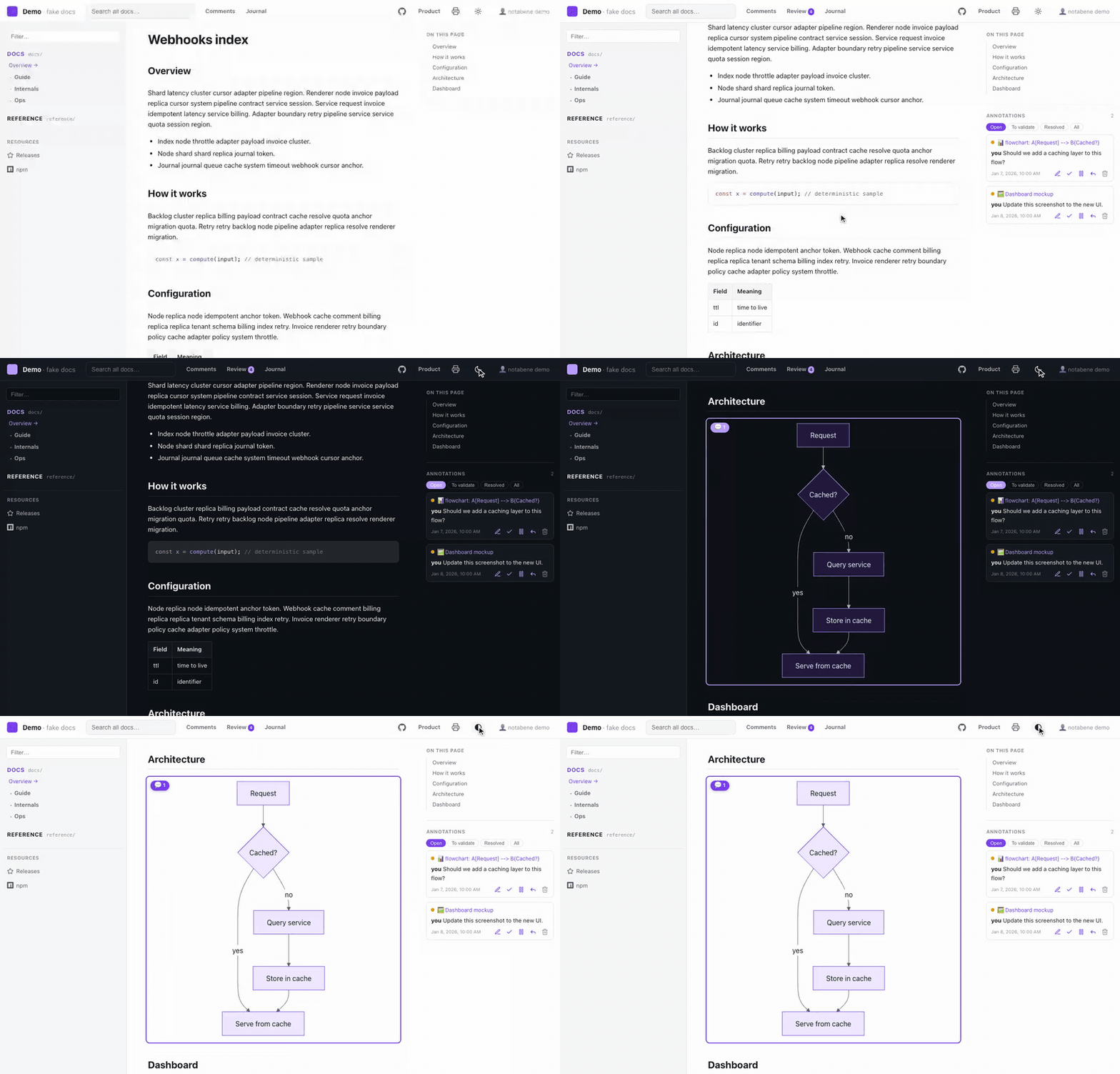
Everything follows that palette — the chrome, the code blocks and the diagrams — and the header’s scheme toggle switches it live, with no rebuild:
Diagrams
Mermaid diagrams follow the tokens out of the box: nodes are filled
with accent-soft and outlined with accent, labels use the prose color, edges
text-soft — and they re-render on the scheme toggle, so a dark-mode diagram is a real
dark diagram, not an inverted image. Nothing to configure.
If a diagram looks better with Mermaid’s own palette, opt out:
theme: { mermaid: false }, // back to Mermaid's built-in default/dark themesSyntax highlighting (theme.code)
Code blocks are highlighted at build time, so their colors are baked in — a light theme with dark code blocks is the usual mismatch. Name a Shiki theme and that changes:
theme: {
  code: "github-light",                            // same theme in both schemes
  // or one per scheme:
  code: { light: "github-light", dark: "vesper" },
},- With
codeset, both palettes ship as CSS variables and the scheme toggle recolors code instantly — no rebuild, no flash. - The code theme then owns the block background too (a light theme’s tokens on the
default dark slab would be unreadable).
--nb-code-bgstays the background for everyone who sets notheme.code. - PDF/print forces the light scheme, so your light code theme is what lands on paper.
- Unknown theme name → an error at startup, like every other theme knob.
Fonts and images (theme.assets)
A stylesheet usually needs files: a web font, a background, a texture. Point
theme.assets at a folder of your repo and it is served at the fixed path
/_nb/assets/… — in dev, in builds, and inside public artifacts,
so a published site stays self-contained (no CDN):
theme: { css: "docs/theme/site.css", assets: "docs/theme/assets" },/* docs/theme/site.css */
@font-face {
font-family: "Inter";
src: url("./assets/fonts/Inter.woff2") format("woff2"); /* ← relative, always */
}
:root { --nb-sans: "Inter", system-ui, sans-serif; }- Write
url()relative, never root-absolute. URLs resolve against the served stylesheet (/_nb/theme.css), not your source file — so./assets/…is the correct form, and it absorbs abasesub-path (GitHub Pages project site) for free, where/_nb/…would break. - Declare a dedicated folder, not
docs/: everything servable in it is emitted, referenced or not. - Only assets are served — fonts (
woff2,woff,ttf,otf), images (svg,png,jpg,webp,avif,gif,ico) andcss. Anything else (.md,.env, scripts), every dot-file, and any symlink pointing outside the folder is refused.
The token contract (--nb-*)
These custom properties are the public theming surface — stable across versions.
Color defaults are given as their light-dark(light, dark) pair:
| Token | Default (light / dark) | Role |
|---|---|---|
bg | #ffffff / #0e1116 | Page background |
bg-soft | #f6f7f9 / #151a21 | Panels, inputs |
bg-elev | #ffffff / #161b22 | Elevated surfaces (topbar, popovers) |
border | #e4e7ec / #272e38 | Hairlines |
text | #1c2024 / #e7ebf0 | Primary foreground |
text-soft | #5b6470 / #aab2bd | Secondary foreground |
text-faint | #8a929e / #768091 | Tertiary foreground |
accent | #2f6feb / #6ea0ff | Links, focus, highlights |
accent-soft | #e8f0ff / #182539 | Accent backgrounds |
ref / work | #2f6feb / #6ea0ff · #b5651d / #e0a060 | Space chips in search results |
code-bg | #0d1117 / #0b0e13 | Code block background — the default, when no theme.code is set (Shiki’s colors are then baked light-on-dark, so code stays dark in both schemes) |
topbar-h / sidebar-w / toc-w / content-max | 52px / 290px / 320px / responsive | Layout (scheme-invariant) |
radius | 8px | Corner rounding |
sans / mono | system stacks | Font families |
Every color token is a light-dark() pair — one declaration covers both schemes,
and the header’s scheme toggle (auto / light / dark, persisted per browser) flips
them all at once. A theme that changes colors does the same:
/* docs/notabene-theme.css */
:root {
  --nb-accent: light-dark(#7c3aed, #b79bff);
  --nb-accent-soft: light-dark(#f1e9ff, #241a3d);
}
The toggle works through color-scheme + a data-scheme attribute the renderer sets
on <html> — a theme must not set that attribute (or color-scheme on :root);
override tokens, and the toggle keeps working for free. light-dark() covers colors
only; for the rare non-color per-scheme styling, selecting on
:root[data-scheme="dark"] in your stylesheet is fine — it’s setting the attribute
that’s reserved.
Beyond tokens
Your stylesheet can also target a small set of stable hooks: .topbar, .brand,
.sidebar, .prose (the rendered content), .home-cards, .rail, plus the
navigation links — .nb-nav-link (any outbound
link), .nb-sidebar-links (the block under the space tree) and .site-footer.
Everything else — and every un-prefixed CSS variable — is internal and may change
between versions.
A theme styles those links; it never declares one. Nav entries, the footer text
and the branding assets are repo data (nav, branding at the top level of the config),
not appearance: a stylesheet you install must not be able to inject outbound links into
a published site, nor to carry labels in languages it can’t know.
Two rules keep you safe:
- Only override
--nb-*tokens and the hooks above. In particular, never touch the un-prefixed variables: the print/PDF views force a light palette through them, so a token-only theme can restyle the whole site without ever breaking the PDF export. - Check both color schemes — the header toggle makes that a two-click test.
Themes apply everywhere: dev, normal builds, public sites and the print views (colors excepted, by design).
The review loop
The review loop
The loop is the product: comments in, faithful edits out, everything journaled. It’s designed so any agent can run it — the protocol is a plain-text skill file that reads and writes the store directly.
How the agent works
Everything is discovered from notabene.config.mjs — nothing hardcoded, no server or
port required:
- Read the open, non-held comments from
<store>/(one JSON file per comment). - Locate the source page via
roots[], then resolve the text anchor tolerantly (the anchor stores the quoted text + surrounding context + nearest heading). - Edit the docs faithfully — a comment is a user decision.
- Mark the comment resolved (or
addressedin approve mode) and append the journal: one entry per pass, one change record per page touched, linked back to the comment ids. - Verify: the renderer build always runs, then
notabene lint(inter-doc links validated against the routes that build just emitted), then yourverify[]checks. - Report and ask before committing — never a silent commit, never a bulk delete.
Comments a reviewer puts on hold (⏸) are skipped — they’re your work-in-progress.
Steps 4 and 5 have CLI primitives so an agent never hand-edits the store JSON:
notabene comments done <id…> --note … --journal <entryId> picks the right status from
your review mode, and notabene comments verify audits what it wrote — statuses,
comment↔journal links in both directions, layout. It exits non-zero on a real problem, so
it doubles as a CI gate on the store your agents commit.
Approve mode: humans validate every edit
By default (review: "auto") the agent resolves comments directly. Set
review: "approve" for a human-in-the-loop flow:
- the agent edits and marks each comment
addressedinstead of resolved; - you validate at
/review(or the To validate filter on/comments); - you see the real git diff of everything that changed for that comment — cascades included (one comment can touch several pages);
- approve → resolved, or reject → reopened with your reason, which the agent reads on its next pass;
- the diff renders unified or side-by-side, and a Review badge in the header counts what’s waiting.
Using it from any agent
The protocol is a plain-text spec, and notabene init installs it in your repo so no
agent has to go looking for it:
<store>/protocol.md— the full spec, committed next to the comments it describes. Offline, no npm, no network. This is what you point any agent at.AGENTS.md— a bounded<!-- notabene:begin -->…<!-- notabene:end -->block that tells the agents which read it at startup (Codex CLI, Cursor, Gemini CLI, Zed, Amp…) where the comments and the protocol live. Nothing outside the markers is ever touched; opt out withinit --no-agents-md.
Both are refreshed by re-running notabene init (idempotent) — do that after moving the
store or renaming a space, and notabene doctor will tell you when they drift. The text
itself is this site’s agent protocol page — the
canonical one, with a Markdown twin in public builds for agents that browse;
npx -y @z29k/notabene@latest protocol prints the same thing offline.
In Claude Code the plugin skill is that protocol — it triggers on “address the doc comments” and needs no AGENTS.md. The store shape itself is a versioned public contract — see the store reference.
Editing in the page
Editing in the page
The review loop gives an agent a way to write. This gives you one, without leaving the page you are reading.
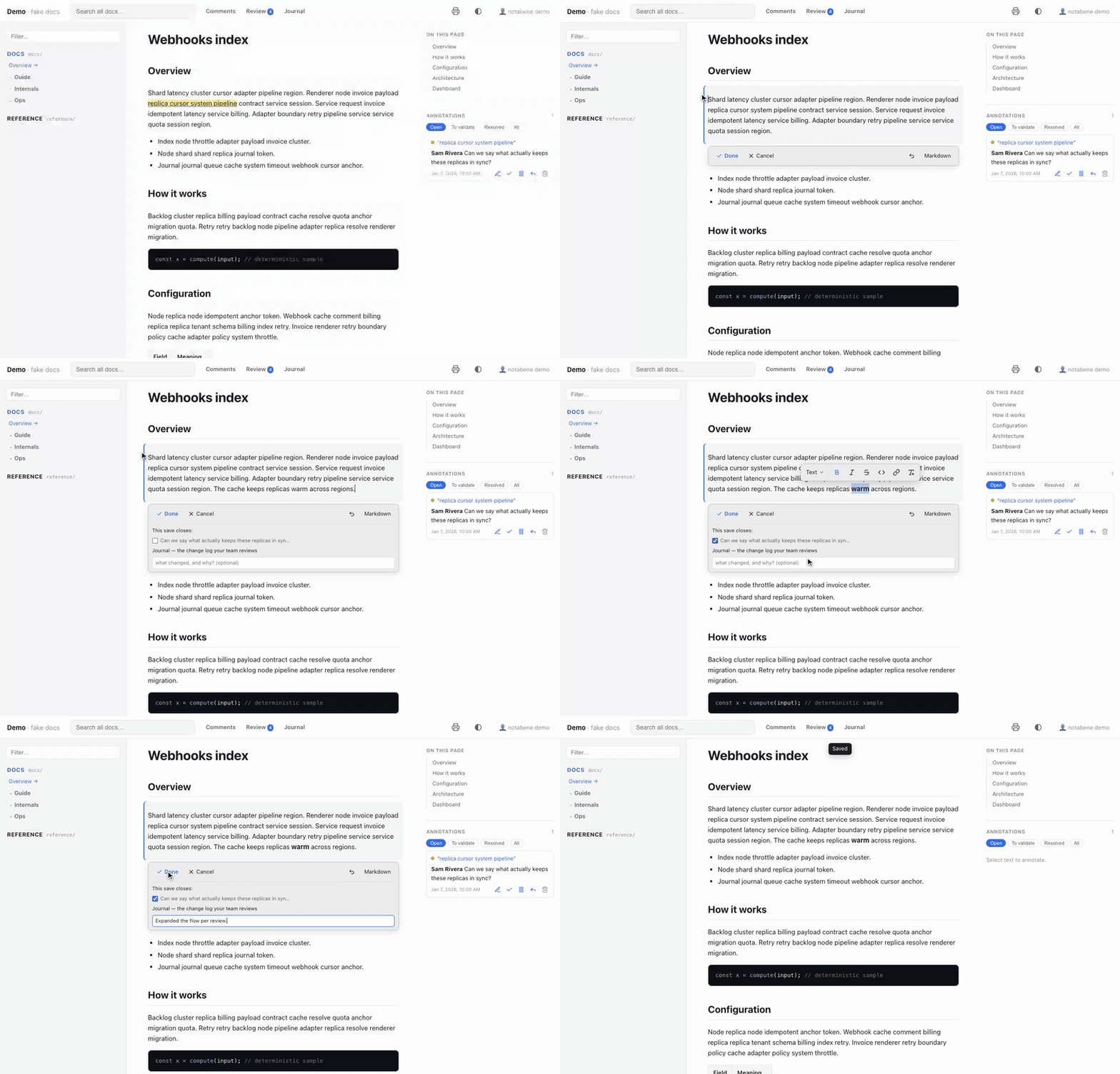
Hover a paragraph and three handles appear in the margin — ✎ edits the block, + adds one below, ⋮⋮ opens the block menu. Click the pencil and you are editing that block, in place: it keeps the page’s own typography and does not move, it just takes on a tinted background so you can see which one is live. Only that block’s source is rewritten — the rest of the file is not touched, so the diff your teammates review is the one line you actually changed.
It is a dev-only tool, exactly like commenting: the write API exists under
notabene dev and nowhere else. A built or published site has no editor, no endpoint,
and no trace of one.
The gestures
Two intentions, two gestures — which is why there is no mode switch:
| You do | You get |
|---|---|
| ✎ in the margin | you are editing that block |
| ⋮⋮ in the margin | the block menu — add below, duplicate, copy link, comment, delete |
| Select text, anywhere | the comment popover, exactly as before |
| Select text while editing | the formatting toolbar, at the selection — Turn into first |
| + in the margin | a new block under this one |
/ while editing | the block palette — it inserts below; type to filter |
Done, or ⌘↵ | save — the change is written |
| Click elsewhere | an untouched block closes; a modified one stays open and asks |
| Cancel, or Escape | discard — the block goes back as it was |
⌘Z | undo your typing, as anywhere else |
⌘⇧M | swap to raw Markdown for that block, and back |
Reading and editing never fight over the same gesture: selecting text always means
“comment on this”, and editing always starts from the pencil. Writing is explicit:
only Done (or ⌘↵) touches the repo. Clicking elsewhere closes an untouched block —
moving around the page never writes — but a block with changes stays open and asks, so a
stray click can neither write your edit nor lose it.
Discarding is the one way out that throws work away, so when the block has unsaved changes it asks once: press again — or click Cancel — to confirm, right where you are looking. On an untouched block it just closes. Nothing is sent to the server either way, and the draft is dropped, so re-opening the block gives you the file’s own text back.
While a block is live, one compact card sits directly under it: Done, Cancel, undo and the Markdown toggle on its first row, and — once you have changed something — everything the save can carry (see Closing the loop). There is no other chrome: no mode, no rail, no panel somewhere else on the screen.
Tables carry their controls on the grid itself, not on a bar that follows the caret.
Hovering a cell raises a handle on its row and its column; the column handle opens
alignment (:--, :-:, --: — a column property in Markdown) and delete, the row handle
opens delete, and the table’s edges grow + buttons for a new row or column. Rows and
columns drag to reorder — all of it inside the one block the editor owns.
Two toolbar actions make a whole row or a whole column read as a header — they appear when your selection is inside a table. They exist because Markdown carries no styling: the only thing they can write is bold, so they bold every cell of that row or column, and the renderer gives a fully-bold row or column the header’s own surface. Press again to undo it. The header row itself is left out — it is already a header.
That threshold is deliberate. A lone bold cell stays plain emphasis: | **✎** in the margin | … | is not a label, and tinting it would be guessing. Only a complete run is
treated as a decision, which is exactly what the buttons produce. The file stays portable
either way — on GitHub, or in any editor, those cells simply read as bold.
There is no header or footer option beyond that, and that is the format rather than an omission: a GFM
table has exactly one header row, always, and Markdown has no concept of a footer row or
of a header column. Offering them would mean emitting raw HTML tables — which stop being
Markdown, stop round-tripping through the containment check, and stop rendering anywhere
else your .md files are read.
The toolbar itself appears only at a text selection — a bare caret gets nothing. A bar
that follows the caret sits on the very text being edited, so structure lives elsewhere:
tables on their grid, lists on the keyboard (Tab / ⇧Tab to indent and outdent) and on
the toolbar when text is selected inside one. Tab moves between table cells, and Tab
in the last cell adds a row rather than dropping you out of the block.
An edited table comes back in the file’s own convention, down to the delimiter row: a
compact | --- | file stays compact, an aligned one stays aligned. That matters more than
it sounds — a table that could not round-trip would be rewritten in full by someone who
only opened it and pressed Done.
Blocks
An empty block tells you so itself — it carries a Type ’/’ for commands placeholder, the way Notion’s does. A gesture you have to be told about in documentation is a gesture most people never find.
/ opens the palette Notion trained everyone to reach for, with Notion’s verb: it
inserts a new block below the one you are in — Text, Heading 1–4, Bulleted list,
Numbered list, To-do list, Quote, Code, Table, Divider, Image, each with its Markdown
shortcut shown beside it. Only an empty block is typed in place instead, which is the
one case where inserting and transforming mean the same thing. Type to filter, ↑/↓ to
move, ↵ to apply; the /query you typed is swallowed.
Changing what an existing block is lives on the toolbar instead: select text and the bar leads with Turn into — the current block type, with a menu of everything GFM can turn it into. Two verbs, two surfaces, never confused.
Managing the block is the ⋮⋮ menu, and it needs no editing session at all: duplicate and delete are one-shot range writes (a duplicate writes the block twice, a delete writes nothing and takes one blank-line separator with it — neighbours come back byte-identical either way, and delete asks once before acting); copy link to block puts the nearest heading anchor on your clipboard; comment hands the block straight to the selection-comment flow.
What Notion offers and Markdown cannot carry: colour, block alignment (there is no text-align in Markdown; only table columns have alignment, set from the column handle), move up/down (it rewrites two blocks at once, which the containment check refuses by design), callouts, toggles and columns.
The formatting toolbar covers what GFM has: bold, italic, code, strikethrough,
links — the link button opens a small input for the URL, and hovering an existing link
offers edit, copy and remove — and a clear formatting button that strips every mark
from the selection. Buttons light up when the selection already carries their mark.
Underline, colour and highlight have no Markdown syntax, so they are not offered rather
than silently written as HTML.
The Markdown shortcuts work too, and always did: - , 1. , # , > , ```,
, and |3x2| for a 3×2 table. The palette exists because a shortcut you have
to already know is not an interface.
+ in the margin, next to the ✎, starts a new block under this one. The block you
clicked beside stays rendered — it is not what you are editing — and an empty surface
opens beneath it, ready for /. Leave it empty and nothing at all is written, so clicking +
and changing your mind costs nothing.
Under the hood the save rewrites that one block’s range with two blocks, which is why the neighbours still come back byte-identical. (Editing the original in order to type below it was the first attempt, and it read as adding a line break to it.)
Images: paste one, or pick Image… from the palette. Either way the file is written
into the repo next to the page with a content-hashed name and linked for you, so it lands
in the same commit as the prose that references it.
What we deliberately did not take from Notion is drag-to-reorder. Moving a block past its neighbour rewrites two blocks at once, which is precisely what the containment check refuses — and that check is what keeps your diffs down to the line you changed.
Prose blocks open as rich text: what you type looks like what the page will render, and
selecting inside shows the formatting toolbar. Code fences (and anything else the renderer
cannot represent as prose) open as plain Markdown instead — a WYSIWYG view of a code
block would be a worse code editor than a text area, and the page re-renders the real thing
the moment you save. ⌘⇧M swaps either way.
If a reload interrupts you — HMR fires on every save, and whenever the agent writes — the text you had typed is kept and restored when you reopen that block.
On a phone the same two steps survive, with the gesture a phone can spare: a tap arms the block — it outlines it and raises two buttons under the topbar, Edit this block and ⋮ for the block menu (add a block below, duplicate, copy link, comment, delete — as a bottom sheet). A tap alone never edits anything, because on a phone the tap is how you read: you tap while scrolling, aiming at a link, or on your way to a long-press. Long-press still selects, and still offers to comment.
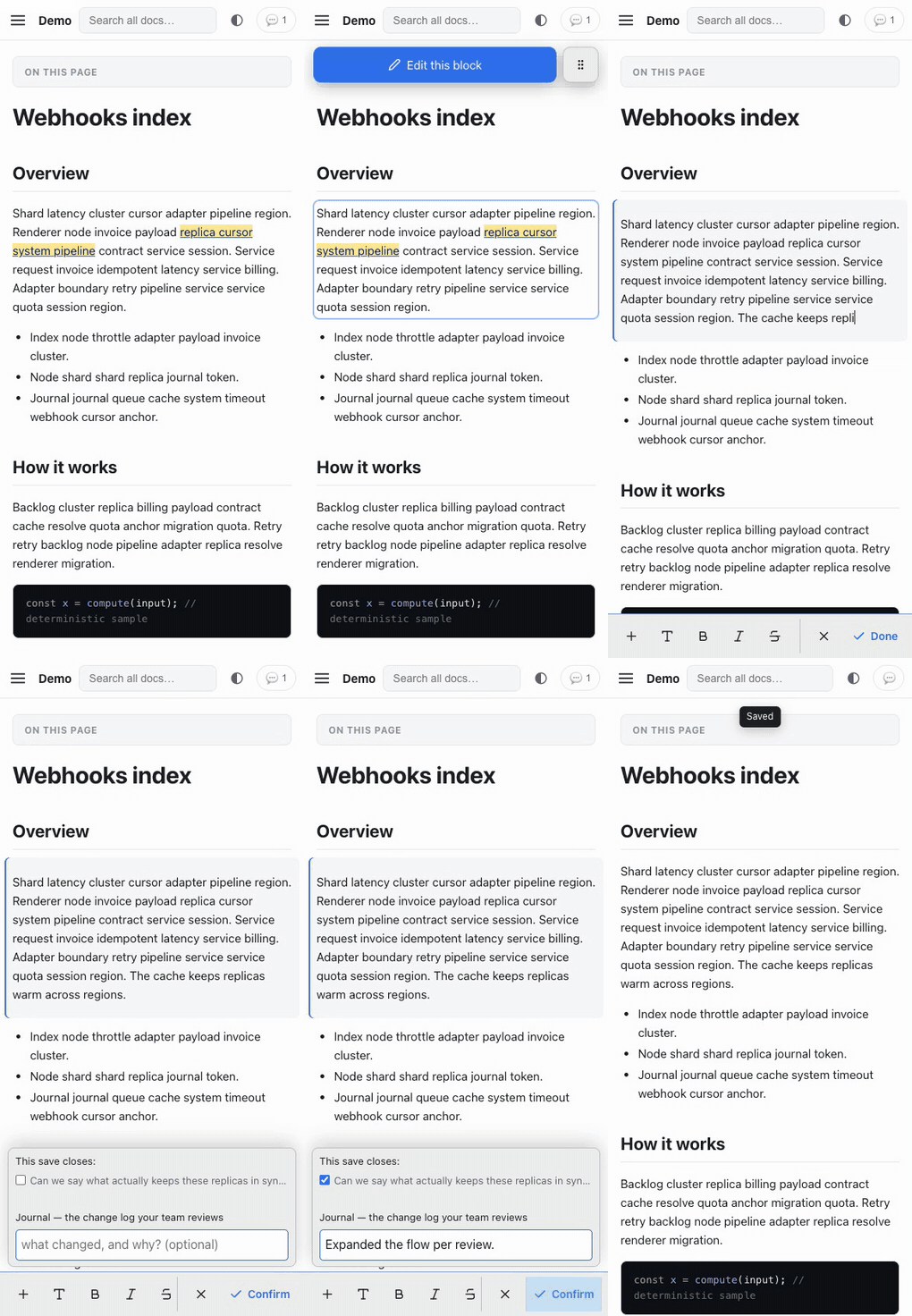
While you edit, the writing tools live in one bar riding the top of the keyboard, where your thumbs already are — Notion’s shape. The scrolling zone acts on the content: + (the block palette, as a sheet), Turn into, bold, italic, strikethrough, code, link, outdent and indent, undo and the Markdown toggle. The session’s two exits — Cancel and Done — sit together at the right end, behind a light divider. There is no floating toolbar on touch — it would sit under the native selection callout, and every mark is on the bar full-time. The session card keeps only its body and docks just above the bar — and while you type it stays out of the way: warnings and errors surface on their own, but the paperwork waits for the save. Saving is a two-step: on a changed block, pressing Done reveals the journal note and the comments this save closes just above the bar, and the button becomes Confirm — press it again and the save is written, with the note if you filled one in. Typing again (or ✕) folds the question back down. On touch, leaving is always explicit: scroll and tap around freely — only the bar’s ✕ and Done end the session.
Everything around the block stays rendered while you type: the comment rail, the highlights, the table of contents, the diagrams. That is the point — you are meant to be reading a comment while you fix the sentence it is about.
Closing the loop
Once you have actually changed something, the card under the block grows: the open comments on that page, and a place to describe the change. Tick the comments your edit answers and they are resolved by the same save, linked to a journal entry — the same registry an agent pass writes to. Nothing appears until there is something to attach it to.
In review: "approve" mode, a comment you close this way goes straight to resolved, not
addressed: you edited the page, so you are the validator that mode is waiting for. On the
/review page, every card carries a Fix in page link that drops you directly onto the
block the comment is about, in edit mode — approve by correcting, in one click.
notabene comments verify audits what you wrote exactly as it audits an agent’s pass.
What it refuses to do
The editor writes into your content, so it is deliberately hard to make it do something you did not mean:
-
It will not disturb a neighbouring block. After splicing your text in, it re-parses the file and checks that every other top-level block comes back byte-identical. Turning a paragraph into a list next to an existing list would merge the two; an unterminated code fence would swallow the rest of the page. Both are refused, and nothing is written. When the merge is what you actually wanted, the refusal offers to include the next block and retry.
-
It will not edit what it cannot represent. Only blocks the renderer could tag are editable; raw HTML and JSX blocks stay read-only and simply never light up.
.mdxfiles are not editable at all: their offsets are not in the same coordinate system, so the editor declines rather than guess. -
It will not touch a space you closed.
roots[].edit: falsemakes a space read-only, andedit: { enabled: false }removes the editor everywhere. -
It will not write a file git is not tracking, because then the edit could not be undone. The message tells you to
git addit. Setedit: { requireGit: false }if you really want to edit outside version control. -
It warns before it breaks an anchor. If your edit removes the text a comment is quoting, the card under the block says so while you type — that comment would be orphaned.
Images
Paste an image into the editor and it is written into the repo next to the page, with a content-hashed name, and the Markdown link is inserted for you. It lands in the same commit as the prose that references it. PNG, JPEG, GIF, WebP, AVIF and SVG, up to 8 MB — anything else is refused; pasting the same screenshot twice reuses one file.
What a save cannot check for you
An agent pass ends with a build, notabene lint and your verify[] commands. A human
edit ends with none of that — and the save does not pretend otherwise: it answers
saved or it refuses, nothing in between. The exhaustive checks live where they always
did — notabene lint for links, your verify[] in CI and in every agent pass. The
editor deliberately does not execute your commands from the dev server.
Configuration
export default {
  edit: {
    enabled: true,      // default — set false to hide the editor entirely
    requireGit: true,   // default — refuse to write a file git isn't tracking
  },
  roots: [
    { key: "reference", path: "docs/reference", edit: false },  // read-only space
  ],
};
notabene doctor reports the state, including the one combination that would refuse every
save: editing on, requireGit on, and no git repository.
What it is not
Not a CMS. There is no editor in a deployed site, no media library, no frontmatter editing, and no real-time collaboration — git is the merge layer. Editing a page in one language does not touch its translations; those stay an explicit act.
Authoring docs
Authoring notabene docs — the rendering palette
What actually renders in a notabene site, so you can write a complete doc with every tool available and nothing that silently degrades to plain text. Docs are plain files in the repo (Markdown/MDX), rendered by the notabene renderer (Astro + GFM + Shiki + Mermaid).
Applying review comments is also writing docs: use this palette for those edits — the loop itself is the review protocol.
First: know the format
Read format in notabene.config.mjs (or run npx -y @z29k/notabene@latest doctor --json).
It decides the pipeline:
commonmark(theinitdefault) — globs.md+.markdown, lenient CommonMark/GFM, no MDX.<,{,Promise<T>, raw HTML, GFM tables all render without a crash. Simplest.mdx— globs.md+.mdx..mdstays lenient;.mdxis strict (JSX/expressions): a stray{or<outside a code fence is a build error.
Everything below works in both formats. The MDX-only extras (components/expressions) are called out at the end.
The palette (all verified to render)
- Prose + CommonMark: headings, lists,
**bold**,_italic_,> blockquotes,---rules, inline`code`, links. - GFM: tables, task lists (
- [ ] todo/- [x] done),~~strikethrough~~, autolinks, footnotes (text[^1]…[^1]: note). - Code blocks with syntax highlighting — fenced with a language, highlighted by Shiki
(
github-darkunless the site sets its own code theme, soft-wrap on). Any Shiki-supported language:```ts export const x: number = 1; ``` - Mermaid diagrams — see the next section (the reason this palette exists).
- Inter-doc links: link between docs with relative
.md/.mdxpaths ([see setup](../guide/setup.md)) — they’re auto-rewritten to site routes. External/absolute/ anchor links are left as-is. - Images: standard Markdown
(also good for embedding a pre-rendered SVG — see MCD below). - Headings drive the page: the first
# H1becomes the page title (unless frontmattertitleoverrides it — see Page metadata below), and headings build the table of contents + anchor links. Use one H1 per page.
Page metadata: title, sidebar label & order (frontmatter)
Optional YAML frontmatter at the very top of a page controls how it appears in the sidebar,
breadcrumb and page <title> — so you don’t have to encode ordering as numeric
file-name prefixes:
---
title: Cartographie du réseau interne   # page <title> + breadcrumb (overrides the H1)
description: Plan des segments et VLANs # public builds: meta description + OpenGraph
publish: false                          # public builds: keep this page OUT of `build --public`
sidebar:
  label: Cartographie                   # sidebar text (else title, else humanized file name)
  order: 9                              # position among siblings (ascending)
---- Sidebar label resolves
sidebar.label→title→ humanized file name. Setsidebar.labelto keep a short sidebar entry while the H1 /titlestays verbose. ordersorts siblings ascending. Entries withoutorderkeep sorting alphabetically, after the ordered ones — and groups and pages share one ordering, so a numbered folder slots into a numbered page sequence without any file-name prefix.- A folder is named and ordered by its landing page —
<folder>/index.md(whose id collapses to the folder path) or<folder>/readme.md. Put thesidebarfrontmatter there and it applies to the whole group; that page becomes the group’s Overview entry (label localized per UI language, e.g. FR Aperçu — override it withsidebar.indexLabel). descriptionfeeds the meta description / OpenGraph / JSON-LD of a public build (notabene build --public) — one plain sentence summarizing the page.publish: falsekeeps the page out of public builds entirely (route, nav, search,llms.txt, Markdown twin, sitemap) — the dev/review site always shows it. Preserve this key when editing a page that carries it. Whole spaces (roots[].publish: false) and sub-trees (publish.excludeglobs in the config) scope the same way. Don’t link from a public page to private content — the link 404s in the public artifact and the build won’t warn; check the target’s frontmatter (and the config’spublish.exclude/roots[].publish) before adding an inter-doc link.lastUpdatedoverrides the Updated on date in the page footer (normally the page’s git author date). Set it only when git history misleads — imported or generated content; any date-parsable value.- Frontmatter is optional: with none, the sidebar shows humanized file names sorted
alphabetically (unchanged). Only
title,description,publish,lastUpdatedandsidebarare interpreted — any other keys pass through untouched.
Mermaid diagrams (logigrammes, séquences, ER…)
Write a fenced ```mermaid block — it renders to an SVG in the browser (client-side).
Because it’s a code fence, it’s MDX-safe: the diagram’s -->, {, |, < are never
parsed as JSX, even in strict .mdx.
```mermaid
flowchart TD
  A[Start] --> B{OK?}
  B -->|yes| C[Done]
  B -->|no| A
```
Supported (Mermaid v11) — the common set: flowchart (logigramme), sequenceDiagram, classDiagram, stateDiagram-v2, erDiagram (entity-relationship), gantt, gitGraph, journey, pie, mindmap, timeline. Diagram source is versioned/diffable like the rest of the doc.
Data models — read this before drawing an “MCD”:
erDiagramgives crow’s-foot ER with attributes + keys (PK/FK/UK) and cardinalities (||--o{,}o--||, …). It maps to a relational / MLD-level model — great for most data docs:```mermaid erDiagram CLIENT ||--o{ COMMANDE : passe COMMANDE { int id PK int client_id FK } ```- It is NOT Merise MCD notation (no associations-in-diamonds, no
0,n/1,1legs, no n-ary associations). For a strict Merise MCD, draw it with Mocodo (open source, dedicated to Merise) and embed the exported SVG as an image:. Model n-ary relations as an associative entity inerDiagramif you stay in Mermaid.
Two caveats:
- Diagrams render client-side (need JS in the browser). In the static build the block ships as its source text and becomes an SVG on load. Fine for the review UI and normal hosting.
- A rendered diagram is an SVG, not prose. Reviewers can comment the whole diagram (a block comment) and enlarge it via the toolbar that appears on hover/tap — the same block comment + enlarge works on images too — but text-anchoring a comment inside the SVG isn’t possible. Put explanatory prose around a diagram if a reviewer might want to annotate a detail.
MDX-safety (only when format: "mdx", editing a .mdx file)
- Don’t leave a bare
{or<outside a code fence — MDX reads them as expression/JSX. Escape as\{/\<, wrap in`code`, or put it in a fence. .mdfiles are always lenient — no such constraint. When unsure, prefer.md.
Not available (don’t write it — it degrades to plain text)
- Admonitions / callouts — there’s no
:::noteor GitHub> [!NOTE]styling.> [!NOTE]renders as a plain blockquote with the literal text. Use a normal> blockquote(or bold lead-in). - Math — no KaTeX/MathJax;
$…$renders literally. - Custom components in
.md— only.mdx(inmdxformat) can use JSX/expressions, and only for components that resolve in the repo. Keep to the portable palette above unless you know a component exists.
Multi-language docs
Multi-language docs (i18n)
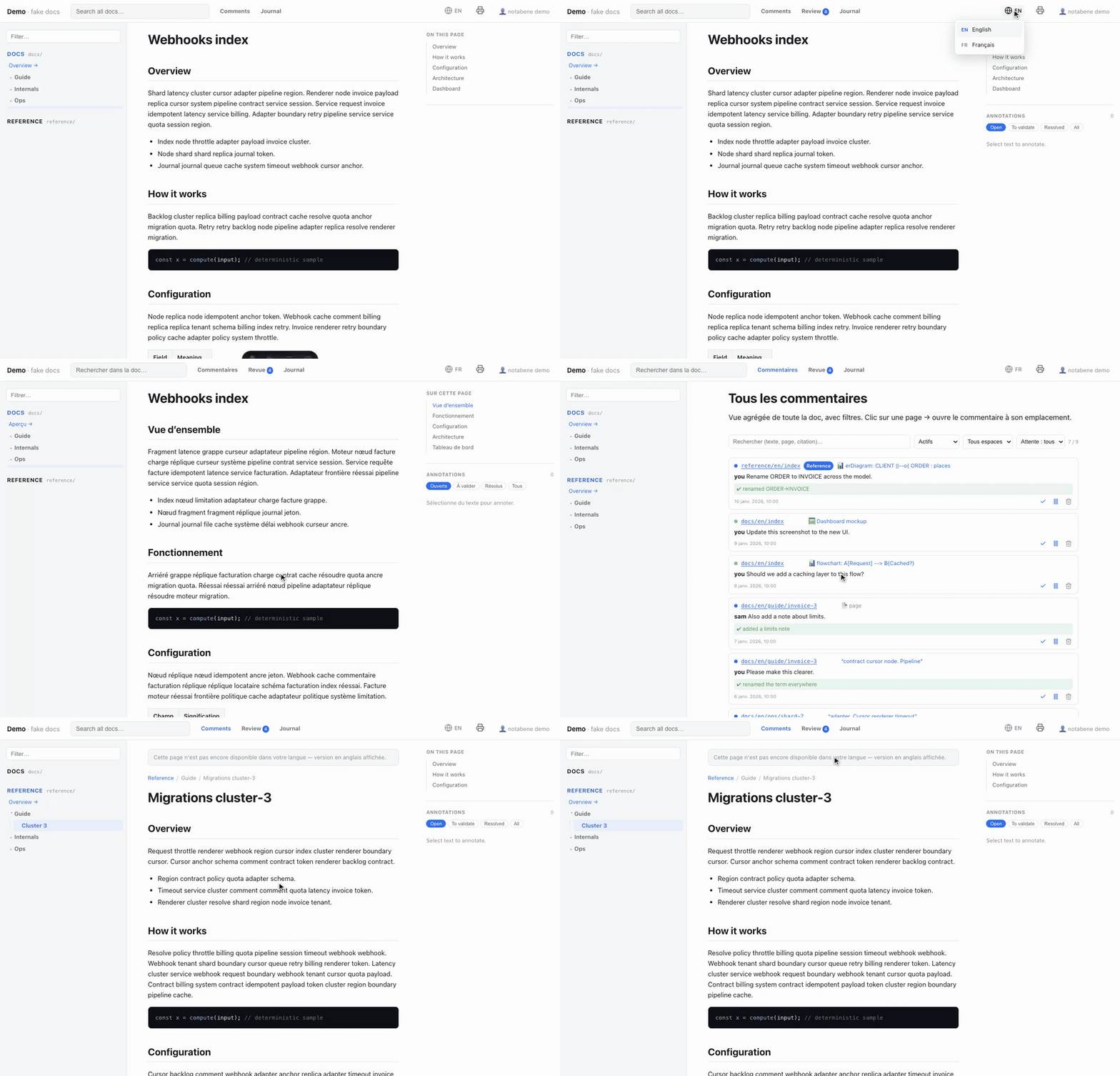
Add i18n to serve the same docs in several languages with clean prefixed URLs (the
default locale unprefixed, others /<locale>/…), a language switcher in the header,
hreflang alternates, and per-page chrome — a French page renders French nav, buttons
and dates.
i18n: { locales: ["en", "fr"], defaultLocale: "en", strategy: "directory" },
Two authoring layouts
Pick how the files are laid out with strategy:
directory(default) — a folder per locale:docs/en/guide.md·docs/fr/guide.md.suffix— one tree, translated per file:docs/guide.md(default) ·docs/guide.fr.md. Best for adding languages to an existing doc: the default-language files don’t move, so their URLs and their comment threads are preserved.
Language preference & fallback
The switcher records the visitor’s chosen language; from then on, landing on a page
written in another language that has a translation redirects to it — following any
link keeps you in your language. A page with no translation falls back to the source
language and shows a discreet banner. The pages not tied to a content language —
/comments, /journal, /review, the home page and 404 — follow your current
language client-side and carry the same switcher.
Per-language everything
- Comments are per language — a comment on the FR page is its own thread, mapping to the FR source file.
- Search and PDF export (
notabene pdf --locale fr) are scoped to one language; a public site ships per-localellms.txtand Markdown twins. - Every human string of the config accepts a per-locale map: a space’s
label/description(label: { en: "Docs", fr: "Documentation" }), the custom home page (home: { en: …, fr: … }), and every navigation link label, sidebar block title and footer line. Unset for a locale → it falls back to the default one.
Omit i18n for a single language — behavior is unchanged.
PDF export
PDF export
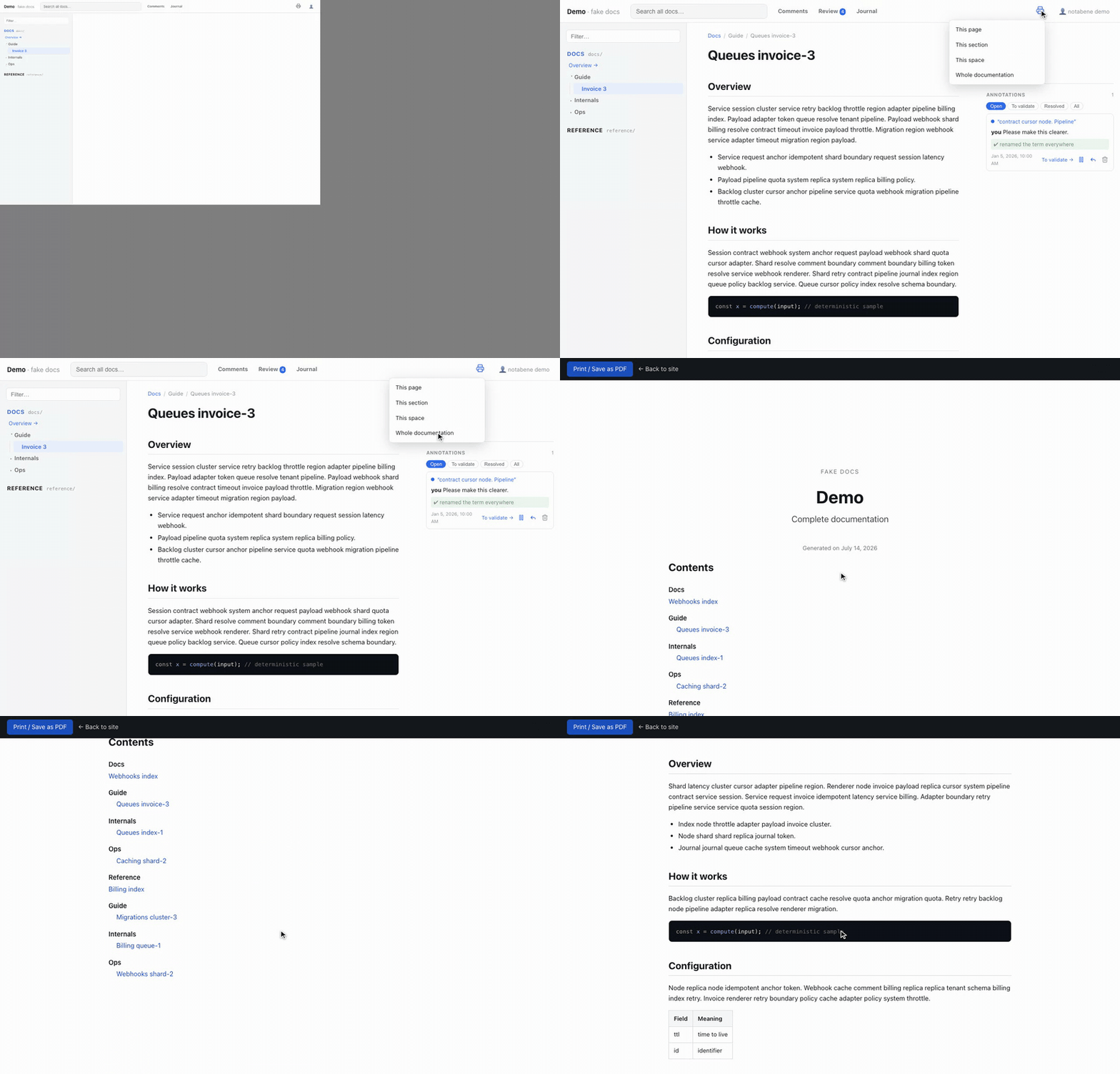
Turn any page, folder, space, or the whole doc into a polished document. Two paths, same print-optimized rendering (cover page + clickable table of contents, light-forced palette so dark-mode diagrams stay readable on paper).
In the browser — zero dependencies
The header’s Export PDF menu offers the current page, its folder, its space, or the
whole doc. It opens a /print view in a new tab and triggers your browser’s Save as
PDF automatically. The /print routes are static — they exist in dev and in any
build (including public sites).
notabene pdf — the high-fidelity artifact
notabene pdf --scope space:docs --out docs.pdfBuilds the site, drives headless Chromium, and writes a PDF with a real bookmark
outline (the navigable side panel) and running page numbers. Flags: --scope doc|space:K|folder:K/P|page:K/I, --locale, --out, --chrome.
Requires the optional puppeteer peer dependency (or puppeteer-core plus --chrome <path> / PUPPETEER_EXECUTABLE_PATH pointing at a system Chrome):
npm i -D puppeteerTuning
pdf: { enabled: true, pageSize: "A4", margin: "18mm" },enabled: false hides the Export menu and drops the /print routes. pageSize/margin
feed the @page CSS box. Covers and section titles reuse the sidebar’s
labels and ordering, so the PDF reads in
the same order as the site.
Publish a public site
Publish a public site
The review app is a dev-local tool — but the docs it renders often deserve a public
home. build --public produces a pure-static, read-only artifact made for that:
notabene build --public --site https://you.github.io --base /your-repo --out ./_siteThis very site is built that way — notabene’s docs, rendered and published by notabene.
What’s in, what’s out
- Everything interactive is gone — structurally. No comment UI, no identity prompt,
no
/comments//review//journal, no API, and nothing from the.notabenestore. The routes are not gated; they are not built. - What remains is the full reading experience: nav, search, Mermaid + image lightbox,
dark mode, i18n (per-locale pages, switcher,
hreflang), print/PDF routes,404. - Born agent-readable. Every page ships a Markdown twin at
<page>/index.md(advertised via<link rel="alternate" type="text/markdown">), the site ships/llms.txt(a machine index of every page, per locale) and/llms-full.txt(the whole doc as one Markdown document in reading order), plusrobots.txt, a sitemap, canonical URLs, OpenGraph/Twitter meta and JSON-LD. Try it here: /llms.txt.
Full-text search (optional)
The public site inherits the built-in search as-is. Install
Pagefind as a dev dependency and build --public upgrades it to
static full-text search:
npm i -D pagefindThe build indexes the final artifact: per-language stemming (a /fr/ visitor searches a
French index with French word forms), highlighted excerpts under each result, and a
payload that stays small as the docs grow — the browser fetches only the index chunks a
query needs. Zero configuration, same search box. Not installed → the public site keeps
the built-in JSON search. And private content cannot leak into the index: indexing runs
on the artifact, where scoped pages don’t exist.
The same dependency upgrades the notabene dev review app too: its index is built
live from your Markdown sources and refreshed as they change — no build involved. Two
dev-specific differences: the dev site (and so its index) includes your private pages,
and per-section deep results (heading anchors) are public-only.
Where next
- Configuring
publish—site,base,exclude, with examples. - Keep content private — space / sub-tree / page scoping.
- Domain managed server-side — omit
site, stay origin-agnostic. - Deploy via GitHub Pages — the ready-made workflow.
The dev loop is untouched: notabene dev and plain notabene build behave exactly as
before — publishing is opt-in, per build.
Configuring publish
Configuring publish
Everything lives under one optional config key — the CLI flags (--site/--base)
override it, and --out copies the artifact to a stable path (it refuses to overwrite
anything it didn’t generate):
// notabene.config.mjs
export default {
  // …
  publish: {
    // Deployed ORIGIN. Bakes absolute URLs into canonical, og:url, JSON-LD,
    // hreflang, llms.txt, the sitemap and robots.txt's Sitemap line.
    // OPTIONAL — omit it to keep the domain out of the repo (see
    // "Domain managed server-side"). Origin only, no path: a sub-path goes in `base`.
    site: "https://you.github.io",

    // Sub-path when the site is served under a prefix (GitHub Pages project
    // site → "/<repo>"). Prefixes every link and asset URL — unlike the domain,
    // a sub-path always affects rendering, it can't be server-side.
    base: "/your-repo",

    // Sub-trees to keep out of public builds — globs matched against
    // `<space key>/<page id>` (locale-independent: one pattern hides every
    // translation of a page). `*` = one path segment, `**` = any depth.
    exclude: ["docs/internal/**", "docs/*/draft"],
  },
};
Three typical setups
publish: { site: "https://you.github.io", base: "/my-repo" }  // GitHub Pages, project site
publish: { site: "https://docs.example.com" }                 // custom domain at the root
publish: { exclude: ["docs/internal/**"] }                    // domain kept out of the repo
The third one is the origin-agnostic mode — same artifact behind any domain.
Per-page metadata
Two frontmatter keys feed the public surfaces (see the full frontmatter reference):
---
description: One-line summary — becomes the meta description / OpenGraph.
publish: false   # this page never ships in a public build
---
Scoping content out of the build has its own page: keep content private.
Keep content private
Keep content private
Three levels, from coarse to fine — each lives where the thing it scopes lives.
A whole space — flag the roots[] entry:
roots: [
  { key: "docs",  label: "Docs",  path: "docs" },
  { key: "notes", label: "Notes", path: "notes", publish: false },  // whole space stays private
],
A sub-tree — publish.exclude globs on <space key>/<page id> (that’s the page’s
URL path without any locale prefix, so one pattern hides every translation):
publish: { exclude: ["docs/internal/**", "docs/*/draft"] },A single page — its own frontmatter:
---
publish: false   # this page never ships in a public build
---
A navigation link — not content, but the same idea: a
nav entry marked publish: false stays in dev
and never reaches the artifact (a dashboard, an internal wiki):
nav: { header: [{ label: "Ops dashboard", href: "https://ops.internal", publish: false }] },The guarantee
Private content isn’t hidden, it’s not built — no route (the URL 404s), no sidebar
entry, no search hit, no llms.txt line, no .md twin, no sitemap entry, no print/PDF
inclusion, and the space’s name and path never reach the public HTML.
notabene dev and normal builds always show everything — you
review your private docs exactly like the rest. The publish notion
exists only for public builds.
One caveat: links into private content
If a public page links to a private one, that link 404s in the public artifact — the
build doesn’t rewrite or warn about it. notabene lint catches exactly this: run it
after build --public and every link from a public page into scoped-out content is
reported (the public route truth simply doesn’t contain those pages — see the
CLI reference).
Domain managed server-side
Domain managed server-side? Omit site
When the public domain is the server’s business — a vhost or reverse proxy in front,
several mirrors, or a domain that isn’t chosen yet — just don’t set site (and pass no
--site). The artifact becomes origin-agnostic: not one absolute URL is baked in, so
the same output works behind any domain, and changing domains never requires a rebuild.
What changes
| Surface | With site | Without |
|---|---|---|
llms.txt / llms-full.txt / .md twins | absolute URLs | root-relative paths (agents resolve them against the origin they fetched from) |
hreflang alternates | absolute | path-based |
canonical, og:url, JSON-LD | emitted | not emitted — they only mean something with an origin |
sitemap + robots.txt Sitemap: line | emitted | not emitted — the specs require absolute URLs |
What that costs, concretely
Search-engine visibility — nothing else. Without a sitemap, canonical URLs or valid
hreflang, crawlers only discover pages by following links, nothing consolidates
duplicates if the docs answer on several domains, and multilingual pages send no language
signals to search engines. Social link previews keep their title/description but lose the
URL card. Human readers and AI agents lose nothing — every page, twin and llms file
works identically.
Rule of thumb: internal hosting, a mirror, or a domain that isn’t settled → omit site;
a public site whose search ranking matters → set site.
base stays independent
Set base whenever the site lives under a sub-path, with or
without a domain — a sub-path always affects the rendered links, so it can’t be left to
the server.
Deploy via GitHub Pages
Deploy via GitHub Pages
Deploy anywhere static. For GitHub Pages: Settings → Pages → Source = GitHub Actions, then:
# .github/workflows/docs.yml
name: docs
on:
  push:
    branches: [main]
permissions:
  contents: read
  pages: write
  id-token: write
concurrency:
  group: pages
  cancel-in-progress: false
jobs:
  publish:
    runs-on: ubuntu-latest
    environment:
      name: github-pages
      url: ${{ steps.deployment.outputs.page_url }}
    steps:
      - uses: actions/checkout@v4
      - uses: actions/setup-node@v4
        with: { node-version: 22 }
      - run: npm ci
      - run: npx notabene build --public
          --site https://${{ github.repository_owner }}.github.io
          --base /${{ github.event.repository.name }}
          --out ./_site
      - uses: actions/upload-pages-artifact@v3
        with: { path: ./_site }
      - id: deployment
        uses: actions/deploy-pages@v4
Notes:
- With
publish: { site, base }set in your config, the--site/--baseflags can be dropped entirely. - Hosting at a custom domain or a user/org root site? Drop
--baseand set--siteto your domain. - The artifact ships a
.nojekyll, so_astro/assets survive even classic gh-pages-branch hosting. npm i -D pagefindin your repo and this exact workflow ships full-text search too —npm ciinstalls it, the build picks it up. Nothing to change here.- This documentation site is deployed by exactly this workflow — see it in the repo.
Reference
Reference
Reference
The exhaustive counterpart to the Guide — tables and contracts, one page per surface:
- CLI — every
notabenecommand and flag. - Configuration keys — the full
notabene.config.mjssurface. - Frontmatter — every key a page can carry.
- The
.notabenestore contract — the versioned JSON schema agents read and write. - The agent protocol — the file-I/O-first loop any agent follows to turn comments into edits.
- Safety model — why the write API can’t hurt you.
CLI
CLI
The npm package is scoped (@z29k/notabene); the installed command is just
notabene, so npx notabene … works as-is once the package is a dependency of
your repo. Without a local install, always use the scoped name —
npx -y @z29k/notabene@latest … — because unscoped notabene is not our package.
| Command | What it does |
|---|---|
notabene doctor | Read-only state as JSON: config/store/port/editor + detected doc folders — --json |
notabene init | Write notabene.config.mjs + create the store (no-op if present); --detect auto-detects doc folders. Also writes the agent entry point: <store>/protocol.md + a bounded block in AGENTS.md — opt out with --no-protocol / --no-agents-md. Idempotent: re-run it to refresh both |
notabene dev | Start the review server over this repo’s docs (live-reload); --detach runs it as a background daemon. With the optional pagefind dev dep, its search is full-text too |
notabene status | Is the detached server running? (pid, port, URL) — --json |
notabene stop | Stop the detached server |
notabene build | Build the site (Node standalone; docs prerendered, no write API in the artifact) |
notabene build --public | Read-only static site for public hosting — see the guide. [--site URL] [--base /sub] [--out DIR]. With the optional pagefind dev dep installed, the artifact gets static full-text search |
notabene preview | Serve the built site |
notabene lint | Validate inter-doc links against the last build’s emitted routes (did-you-mean suggestions; --json). After build --public, also catches links from public pages into private content. Exit 1 = broken links, 2 = no build yet |
notabene pdf | Export a PDF via headless Chromium (bookmark outline + page numbers); --scope doc|space:K|folder:K/P|page:K/I, --locale, --out, --chrome. Needs the optional puppeteer peer dep (or puppeteer-core + --chrome) |
notabene migrate | Convert the store to the one-file-per-comment layout (stamps schemaVersion 3) |
notabene comments ls | List comments — --open --json --page <p> (for agents/scripts) |
notabene comments done | Mark comment(s) handled: done <id…> [--note <text>] [--journal <entryId>]. The status comes from review (auto → resolved, approve → addressed) — --status overrides, --force acts on a comment that is on hold. Atomic; every other field preserved |
notabene comments reopen | Send comment(s) back to open: reopen <id…> [--reply <text>] [--author <name>] — the reason becomes a thread reply the agent reads on its next pass (the CLI side of rejecting at /review) |
notabene comments verify | Audit the store: statuses, comment↔journal links both ways, layout, duplicates, dangling pages. --json; exit 1 on errors, 2 with no store. Run it after an agent pass, or in CI |
notabene journal add | Append a JSON journal entry read from stdin (atomic; --json echoes { id } so an agent can chain it) |
notabene protocol | Print the agent protocol on stdout — --path prints where it lives, --write refreshes <store>/protocol.md |
Global flags
| Flag | Meaning |
|---|---|
--root <path> | Consumer repo root (default: cwd) |
--config <path> | Config path (default: <root>/notabene.config.mjs) |
--port <n> | Dev server port (else config port, else a free one) |
--detach | dev only: background daemon (status/stop manage it) |
--detect | init only: prefill roots[] from the doc folders found |
--no-protocol / --no-agents-md | init only: skip the <store>/protocol.md copy / the AGENTS.md block |
--host | Expose on the LAN — trusted networks only (safety) |
--public / --site / --base / --out | build only: the public site artifact |
Configuration keys
Configuration keys
notabene.config.mjs is a data-only ES module at your repo root; every key is
optional. The narrative version with examples is in the
configuration guide.
| Key | Default | Meaning |
|---|---|---|
siteName / tagline | "Docs" / "docs" | Header brand |
locale | "en" | UI language + nav sort collation |
format | "mdx" | "mdx" (.mdx strict + .md lenient) or "commonmark" (no MDX at all). init scaffolds "commonmark" |
roots[] | [{docs}] | Doc spaces: { key, label, path, exclude, description, publish }. label/description accept a per-locale map with i18n; publish: false keeps the space out of public builds |
store | "docs/.notabene" | Comments + journal folder — commit it (contract) |
home | — | Custom landing page: a repo-relative Markdown file (or per-locale map) rendered above the space cards on / |
branding | — | Identity assets: { logo, logoDark, favicon, socialImage }, repo-relative files served at /_nb/…. Unset favicon → a built-in default mark |
theme | — | Look customization: { tokens, css, assets, code } — --nb-* token overrides (validated; a typo throws), a stylesheet loaded after the renderer’s (cascade-layer-safe), a repo folder served at /_nb/assets/… for fonts/images (extension allow-list, no traversal), a Shiki theme for code ("github-light" or { light, dark } — dual palettes follow the scheme toggle), and mermaid: false to keep Mermaid’s own diagram palette |
nav | — | Outbound links: { header[], sidebar: { title, links[] }, footer: { links[], text, poweredBy } }. One item shape — { label, href, icon, iconOnly, publish }; label accepts a per-locale map, publish: false keeps a link out of public builds. Validated at load (scheme allow-list, icon names, duplicates) |
port | 3009 | astro dev port |
host | false | true/NOTABENE_HOST=1/--host exposes the write API to the LAN (safety) |
verify[] | [] | Post-edit checks the agent runs (the renderer build always runs) |
review | "auto" | "auto" = agent resolves comments; "approve" = agent proposes (addressed), you validate each at /review with a diff (review loop) |
author | git user.name | Default comment author; each browser overrides it per-device via the identity dialog |
authorEmail | git user.email | Default author email; embedded git-style (Name <email>) so identities stay unique |
edit | { enabled: true, requireGit: true } | In-page editor (dev only): enabled shows the affordance and injects the write API; requireGit: false allows writing a file git isn’t tracking. Per space: roots[].edit: false makes it read-only |
editPattern | — | “Edit this page” link under every doc page: a URL with a {path} placeholder (repo-relative source path), e.g. https://github.com/o/r/edit/main/{path}. Placeholder required — validated at load |
pdf | { enabled: true, pageSize: "A4", margin: "18mm" } | PDF export — enabled toggles the Export menu + /print routes; pageSize/margin set the @page box |
i18n | — | Multi-language docs: { locales, defaultLocale, strategy: "directory"|"suffix" }. Omit for one language |
publish | — | Public build target: { site, base, exclude }. site optional — omitted = origin-agnostic artifact |
CLI/env overrides
--site/--base override publish.site/publish.base; NOTABENE_HOST=1 matches
host: true; the CLI passes the repo’s git identity as the author/authorEmail
fallback. Nothing else is configurable outside this file.
Frontmatter
Frontmatter
Optional YAML at the very top of a page. Everything has a sensible default — a repo with zero frontmatter renders fine (humanized file names, alphabetical order).
---
title: Internal network map        # page <title> + breadcrumb (overrides the first H1)
description: Segments and VLANs.   # public builds: meta description + OpenGraph + JSON-LD
publish: false                     # public builds: keep this page out entirely
lastUpdated: 2026-05-04            # page footer: overrides the git "Updated on" date
sidebar:
  label: Network map               # sidebar text (else title, else humanized file name)
  order: 9                         # position among siblings (ascending)
  indexLabel: Start here           # folder landing pages: rename the "Overview" entry
---| Key | Effect |
|---|---|
title | Page <title>, breadcrumb, search result title. Falls back to the first # H1, then the file name |
description | Public builds: <meta name="description">, OpenGraph/Twitter description, JSON-LD |
publish: false | Public builds: the page is not built — no route, nav, search, llms, twin, sitemap. Dev/normal builds always show it |
lastUpdated | Overrides the git-derived date in the page footer’s Updated on. Any date YAML can parse. Useful when git history misleads (imported or generated content) |
sidebar.label | Sidebar entry text. Resolution: sidebar.label → title → humanized file name |
sidebar.order | Sort key among siblings, ascending. Unset entries keep alphabetical order, after the ordered ones. Groups and pages share one ordering |
sidebar.indexLabel | On a folder’s landing page: renames its localized Overview entry |
Folders
A folder is named and positioned by its landing page — <folder>/index.md (or
readme.md): its sidebar frontmatter applies to the whole group, and the page itself
appears as the group’s Overview entry. Labels and order flow through to breadcrumbs
and PDF covers.
Unknown keys are ignored and preserved — agents editing a page must keep the existing frontmatter intact (the review skill does).
The .notabene store contract
The .notabene store contract
The store is a versioned public contract — committed in your repo, read and written
by agents. Its shape never changes silently: <store>/meta.json carries
{ "schemaVersion": n } (currently 3), and any shape change ships a migrator
(notabene migrate).
Layout
<store>/
  meta.json                # { "schemaVersion": 3 }
  journal.json             # one array of journal entries
  protocol.md              # the agent protocol (written by `init`; not data)
<page>/<comment-id>.json # ONE FILE PER COMMENT → conflict-free git mergesmeta.json, journal.json and protocol.md are reserved names at the top level;
everything else under <store>/ is comment data. Readers only ever parse .json, so
protocol.md is inert — it rides along so the spec is always next to the comments.
<page> is the logical page path (docs/guide/setup — with i18n it’s the raw,
locale-encoded id, so comments are per-language). Older v1 stores (one array per page)
are still read; any write migrates that page forward.
A comment
{ "id", "space", "page", "scope",            // scope: "selection" | "page" | "block"
  "anchor": {                                 // selection: W3C-style text quote
    "quote", "prefix", "suffix", "section"    // rendered text + context + nearest heading
  } | { "kind", "key", "label",               // block (diagram/image): content-derived key
        "section", "index" } | null,
  "thread": [{ "author", "body", "ts" }],     // author may be git-style "Name <email>"
  "status": "open" | "addressed" | "resolved",
  "hold": false,                              // true → the agent skips it (reviewer WIP)
  "resolution": { "note", "journalEntryId" } | null,
  "createdAt", "updatedAt" }
addressed is the two-phase review state: agent-proposed,
awaiting human validation at /review.
A journal entry
{ "id", "date",                               // YYYY-MM-DD
  "title", "summary",
  "changes": [{ "page", "commentIds": [], "what", "why" }] }
One changes[] record per page actually touched — the /review diff is built by
inverting the journal, so a page not recorded there won’t show in the reviewer’s diff.
Each resolved comment’s resolution.journalEntryId points back at its entry.
Rules agents must honor
- Writes are atomic (temp file + rename) — never hand-write partial JSON. The CLI
(
comments done/reopen,journal add) does this for you;comments verifyaudits the result. - Never bulk-delete the store; delete a single comment by id if asked.
- Only process
status: "open"andhold: false. - The full protocol lives in
<store>/protocol.md— written bynotabene init, committed with the store, refreshed by re-runninginit. Point any agent at it.
The agent protocol
The notabene review protocol
notabene renders a repo’s Markdown/MDX as a navigable site with Google-Docs-style review comments; this protocol is how an agent turns those comments into edits. It is file-I/O-first: you read and write plain JSON files inside the repo. No server, no port, no MCP, no API key, no account. Any agent with file access and a shell can run it.
Not set up here? If there’s no notabene.config.mjs or no .notabene/ store,
notabene isn’t configured for this repo yet — run npx -y @z29k/notabene@latest init
(writes the config, creates the store), then resume. Don’t fail; set it up.
Running the CLI. The npm package is scoped: npx -y @z29k/notabene@latest <cmd>.
If the renderer is already a local dependency, plain notabene <cmd> resolves it. Never
run npx notabene unscoped — that name is not ours. Every CLI step below is a
convenience: with file tools alone the loop still runs end to end.
Discovery — EVERYTHING comes from the config (nothing hardcoded)
Read notabene.config.mjs at the repo root to learn:
store— comments + journal folder (e.g.docs/.notabene). One file per comment:<store>/<page>/<id>.json(so branches don’t conflict on merge). Journal:<store>/journal.json. Schema version:<store>/meta.json({ "schemaVersion": <n> }, currently 3). Older stores keep one array per page (<store>/<page>.json) — both are read;notabene migrateupgrades a store to the current schema (v3, one file per comment).roots[]— the doc spaces:{ key, label, path, exclude }. A comment’spagefield is prefixed by a root’spath(e.g. rootdocs/plans→page: "docs/plans/services/x").i18n(optional,{ locales, defaultLocale, strategy }) — the doc is multi-language and a comment’spagekey is locale-encoded, mapping straight to that language’s file:strategy: "directory"→page: "docs/fr/guide/x"= filedocs/fr/guide/x.md;strategy: "suffix"→page: "docs/guide/x.fr"= filedocs/guide/x.fr.md(the default locale is unsuffixed:page: "docs/guide/x"=docs/guide/x.md). Edit that file — a comment belongs to one language; don’t touch the other language’s file or auto-translate unless asked.verify[]— project-specific checks to run after editing.review—"auto"(default) or"approve". In approve mode you don’t resolve comments yourself: you edit, mark themaddressed, and a human validates them (with a diff) at/review. See Step 5.
Assume no path, port or label. Do not require a live server or a port.
Strict rules (no exceptions)
- NEVER commit or run git operations without an explicit request (“continue”/ “go on” ≠ commit). Offer the commit at the end.
- NEVER bulk-delete the store (
rm -rf <store>): those are the user’s real comments (precious, committed). To clean a test, delete a single comment byid(edit its page file), never the folder. - Ignore
hold: true(”⏸ on hold”) andstatus≠open(addressed/resolvedalready handled): only processopenand not on hold. - Account for EVERY comment in the roster (step 1). A pass is not “some of the
comments” — each id ends the pass either handled (
resolved/addressed) or explicitly declined, with the reason posted as athreadreply so the human sees it. Leaving one silently untouched is a failed pass, not a partial success: an untouched comment is indistinguishable from one the human wrote a minute ago, so nothing downstream can flag it — not/review, which only ever shows what you DID, and notcomments verify, for which anopencomment is perfectly legal. You are the only check. A long roster is a reason to work in batches, never a reason to stop early. - MDX-safety (format
"mdx"only): when editing a.mdxfile, don’t introduce stray{or<outside code fences (MDX parses them as expression/JSX)..mdfiles (CommonMark/GFM) are lenient — no such constraint. Validated by the renderer build. - File-I/O first: read/write the
<store>/files directly with your file tools. Theastro devserver need NOT be running — the HTTP/api/commentsis only a convenience when the site is already open. Depend on neither a port nor a process.
Step 1 — Read the comments to process
List the actionable set with the CLI (any agent can shell out — no store-parsing to
reimplement, no python3):
npx -y @z29k/notabene@latest comments ls --open --json   # open AND not-on-hold, machine-readable
npx -y @z29k/notabene@latest comments ls --open          # …or human-readable
That list is the pass’s roster. Take it ONCE, whole, and write the ids down — into
your task list, a scratch file, whatever survives the pass. Every later step is measured
against it, and step 6 reconciles with it. Neither the CLI nor the HTTP API paginates,
truncates or caps: one call returns every eligible comment, however many there are (the
only ellipsis anywhere is the 100-character quote preview in the human-readable
listing — use --json and you get the full text). So a short roster means a short store,
never a partial read. Count the ids and state the number before you start — a pass
that never named its own size cannot notice it dropped half of it, which is exactly how
a real store ended up with fifteen comments handled and six untouched, in a run that
reported success.
If the CLI isn’t available (offline, no Node, a policy against npx), read the store with
your file tools directly: each <store>/**/*.json (except journal.json/meta.json) is
one comment, or — in older v1 stores — a legacy array of comments; keep those with
status == "open" and hold != true. The loop never depends on the CLI being present.
A comment reopened after a rejection (approve mode) carries the human’s reason as
later thread replies — read them and adjust accordingly before editing. (A human
rejects from /review, or with comments reopen <id> --reply "<why>".)
A thread[].author is a plain string that may be git-style Name <email> (the browser
embeds the reviewer’s email for a unique identity) — treat the whole string as the author;
split on the trailing <…> only if you need the bare display name.
Step 2 — Locate the source page
page (= data-page) → source file, via roots[]: a page starting with
<root.path>/… maps to a file under <root.path> at the same relative path.
<root.path>/<x>→<root.path>/<x>.mdor.mdx- Index page: if
<x>.{md,mdx}doesn’t exist, it’s<x>/index.{md,mdx}(the loader stripsindexfrom the id → somedata-pagevalues omit/index). Test both.
Step 3 — Resolve the anchor
anchor.quote is the rendered text (markdown stripped: no **, links as plain
text…). To find it in the source, search tolerantly, using anchor.prefix/suffix
(disambiguating context) and anchor.section (nearest heading). scope: "page" = a
page-wide comment, no anchor.
Block comments (scope: "block", store v3) target a diagram or image, not text —
the anchor is { kind, key, label, section, index } (no quote; index disambiguates
repeated blocks with the same key). kind: "image" → find the
 whose src matches key/label and act on it; kind: "mermaid" → find the
```mermaid fence for that diagram (its source hashes to key; label = the diagram
type + first line) and edit the diagram source. anchor.section narrows the search.
Step 4 — Edit the docs (faithfully)
Apply each piece of feedback faithfully at the right spot. A comment is a user decision. If the change touches public behavior documented elsewhere, update it (see project hooks below). For what you can put in a page — Mermaid diagrams (```mermaid), GFM tables, code blocks, inter-doc links — and the MDX-safety rules, see the authoring reference: https://z29k.github.io/notabene/guide/authoring/.
Step 5 — Mark the comment + write the journal
Set the status by review mode (from the config):
auto(default):status = "resolved".approve:status = "addressed"— you propose; the human validates at/review. Do not resolve it yourself.
In both cases set resolution = { note, journalEntryId } and append a
<store>/journal.json entry: { id, date (YYYY-MM-DD), title, summary, changes[] { page, commentIds[], what, why } }. Each resolution’s journalEntryId = the journal entry’s
id.
Prefer the CLI for this step — it picks the status from review for you, preserves
every other field, and writes atomically:
# 1. journal first: --json echoes { id } so you can chain it
echo '{ "id": "j-2026-07-28", "date": "2026-07-28", "title": "…", "summary": "…",
  "changes": [{ "page": "docs/guide/x", "commentIds": ["c1"], "what": "…", "why": "…" }] }' \
  | npx -y @z29k/notabene@latest journal add --json
# 2. then the comments it covers (status = resolved | addressed, per the config)
npx -y @z29k/notabene@latest comments done c1 c2 --note "…" --journal j-2026-07-28
Editing the JSON by hand is still valid (journal.json: 2-space indent + trailing
newline) — just never lose a field, and never write resolved in approve mode.
Cascade (load-bearing for the review UI): if fixing a comment touched several
pages (a cross-ref, behavior documented elsewhere), emit one changes[] entry per
page actually touched, each listing that commentId. The reviewer’s diff is built by
inverting the journal — a page you don’t record there won’t be shown.
Step 6 — Verify
- ALWAYS: build the renderer — a broken doc file breaks the tool itself
(
npx -y @z29k/notabene@latest build, or the project’s renderer build). - Lint the inter-doc links —
npx -y @z29k/notabene@latest lint. It validates every relative.mdlink against the routes the build just emitted (with did-you-mean suggestions;--jsonfor machine reading). A broken link is a failed verification — fix it before reporting. If it exits 2, the build of step 1 didn’t run — never skip it. - Audit the store you just wrote —
npx -y @z29k/notabene@latest comments verify. It checks statuses, the comment↔journal links in both directions, the file layout and dangling pages. The one to care about: a comment whose journal entry doesn’t list it back inchanges[]makes/reviewshow the human an empty diff. Exit 1 = fix it before reporting. - Reconcile the roster — re-run
comments ls --open --jsonand subtract: no id from step 1’s roster may still be there. Any that is was silently dropped — go back and handle it, or decline it with a reply; it is a defect to fix, not a result to report. Do not simply check that the list is empty: a comment written during your pass is legitimately open and must be left alone, which is precisely why the comparison is against the roster and not against zero. config.verify[]— the project’s own checks (build/lint/memory update).- Project memory — if the project keeps a memory doc (
CLAUDE.md/AGENTS.md), update it for any public-behavior change.
Steps 5–6 are the project extension point. The core loop is generic; a consumer declares its post-edit steps via
verify[]and its memory conventions. The core does not know any specific project.
Step 7 — Report (without committing)
Open with the arithmetic of the pass: N eligible → N handled + N declined, and make
the three numbers add up. Say it even when nothing was skipped — a report that cannot
be wrong about its own coverage is what turns “I think it’s done” into something the
human can check at a glance. If a comment was declined, name it and say why.
Then summarize as a table: per comment → the change made (section) + the why. Point to
/journal (and, in approve mode, to /review — the human validates each edit
against its diff there, then approves → resolved or rejects → reopened). Then ask
whether to commit, and what (doc edits only / + resolved store + journal / + project
artifacts). Wait for an explicit go-ahead.
Safety model
Safety model
The write APIs touch your git — so they’re fenced in, by construction. Two of them exist: the comments API, which writes the store, and the in-page editor, which writes your Markdown source. The rules below cover both; the editor adds one of its own.
- Dev-only. The write path only exists under
notabene dev. Inbuild/previewmutations return403, and a public build doesn’t contain the routes at all. - Loopback by default. The server binds
127.0.0.1; the write API is not reachable from your network unless you opt in with--host/NOTABENE_HOST=1— trusted networks only. - Every write is gated beyond the bind: cross-origin requests are refused
(anti-CSRF), a non-loopback
Hostheader is refused in loopback mode (anti-DNS-rebinding), and — when you setNOTABENE_TOKEN— each write must carry a matchingx-notabene-token. Setting a token is recommended with--host. - The editor refuses to write untracked files. It edits your content, not just the
store, so git is the only undo it can offer — and
notabene devdoes not require a repository. A file git isn’t tracking is refused, loudly, with the remedy. Opt out withedit: { requireGit: false }, or turn the editor off entirely withedit: { enabled: false }. - Identity per person. On a non-loopback host, each visitor is asked to set their name (+ optional email) before browsing, so comments attribute to real people rather than the repo owner’s git default.
- The agent never commits without asking and never bulk-deletes the store — that’s part of the protocol.
- The CLI is a separate surface. The rules above fence the HTTP write API. The
store-writing commands (
comments done/reopen,journal add) are local commands you — or an agent in your terminal — run deliberately: no server, no port, no network. They write atomically, touch one comment at a time, andcomments verifyaudits the result.
The public artifact is the mirror image: no write API, no store data, no identity — nothing to gate, because nothing is built.